Skywire POS 1-Way Interface
Last Update: 4/17/26
Overview
Skywire POS posts sales transactions to Yellow Dog’s API for a one-way integration of F&B sales data.
Sync Approach
Skywire POS pushes transaction data to Yellow Dog.
The Integration consists of two elements:
Skywire’s processes to post sales.
Yellow Dog’s Process Sales Application to process transactions provided by Skywire in order to deplete inventory
Sync Frequency
The push of data is controlled by SkyWire and can be configured to run every 15 minutes, every 4 hours, hourly or daily.
Yellow Dog’s Process Sales Application will be scheduled to run hourly by default.
Configuration Options:
Skywire will be the source of record for all F&B items in Skywire.
For Retail items, see our Skywire POS 2-Way Integration page.
Multiple instances of Skywire to a single Yellow Dog database is supported, though this has not been tested.
Multiple Revenue Centers to one Yellow Dog store is not supported in this integration.
Requirements
POS Partner
Skywire is responsible for configuring and scheduling the integration.
For F&B Items, Skywire generates an ExternalID for the items on their side as part of their implementation processes and populates ItemNumber in their Transaction posts to Yellow Dog's Fetch API.
For info on Retail Items, see our Skywire POS 2-Way Integration page
Yellow Dog
Yellow Dog will need to provide the following detail to Skywire to provide API access:
Client ID
Username
Password
Yellow Dog Integrations Installation Team member will need to set up and schedule the Process Sales Application.
Client
Client will need to provide Profit Center External IDs to be used for revenue center mapping.
Client is responsible for mapping sold F&B Items from Skywire to recipes in Yellow Dog.
Data Exchange
Sales Data from POS
Skywire posts sales data to Yellow Dog and their sync can be configured to run every 15 minutes, every 4 hours, hourly or daily.
Yellow Dog’s Process Sales Application will be scheduled to run hourly by default.
Skywire profitCenter.externalIds are populated into Yellow Dog’s Store.RevenueCenter field to map stores between systems.
All F&B Items must be mapped to recipes in Yellow Dog via POS Item Map; the items will only be available for mapping after they have been sold and Skytab has posted the sales to Yellow Dog’s API.
Skywire posts the following sales data to Yellow Dog’s API:
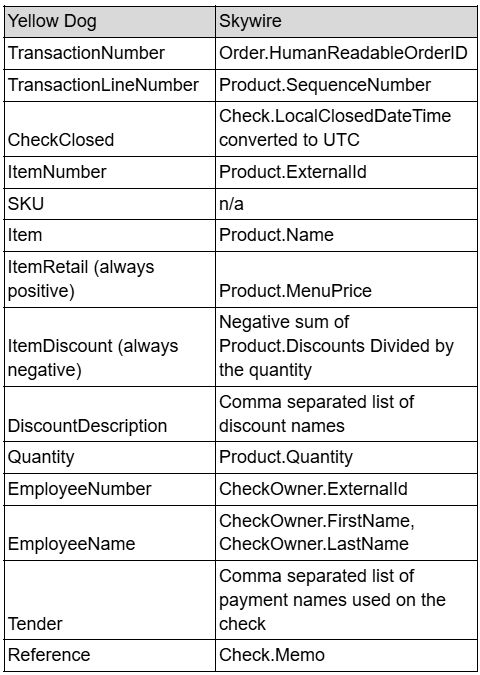
Modifiers are supported in this integration.
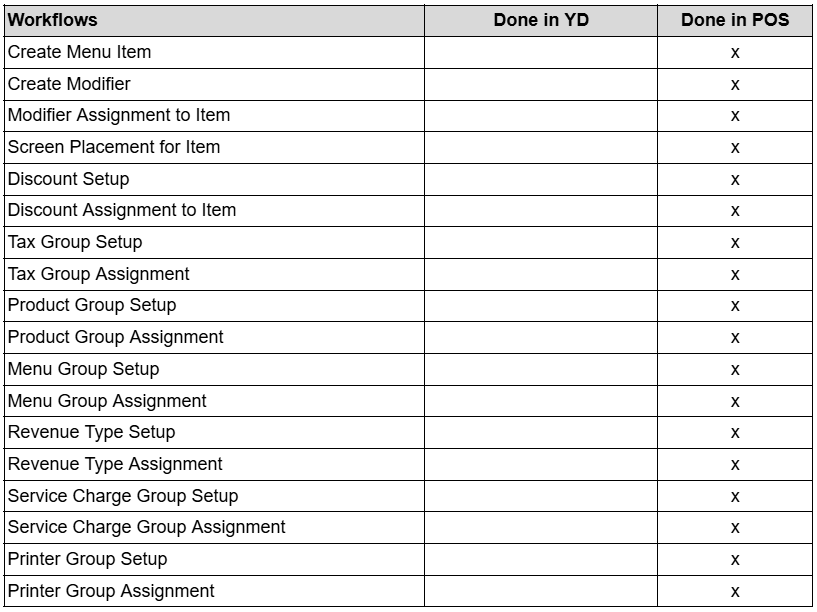
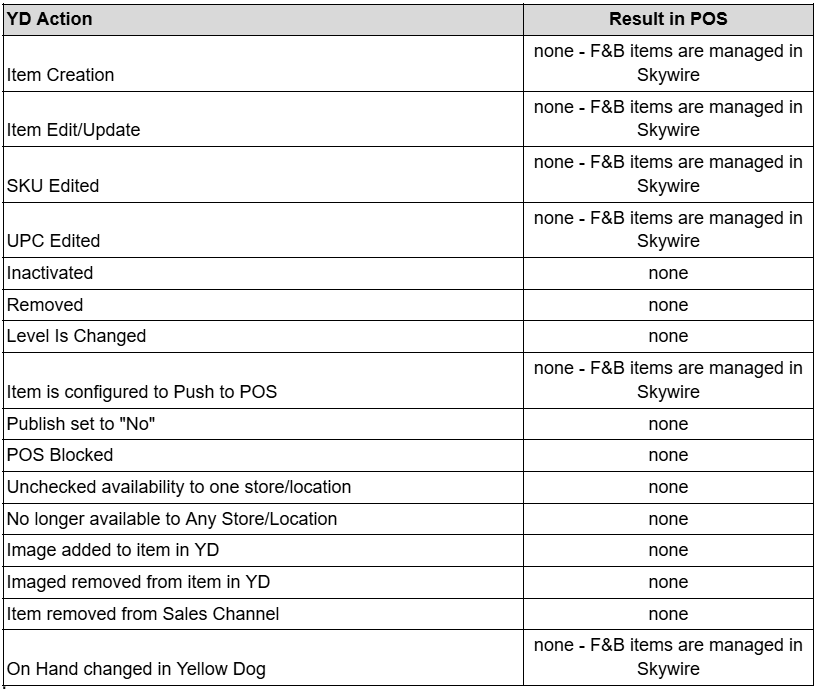
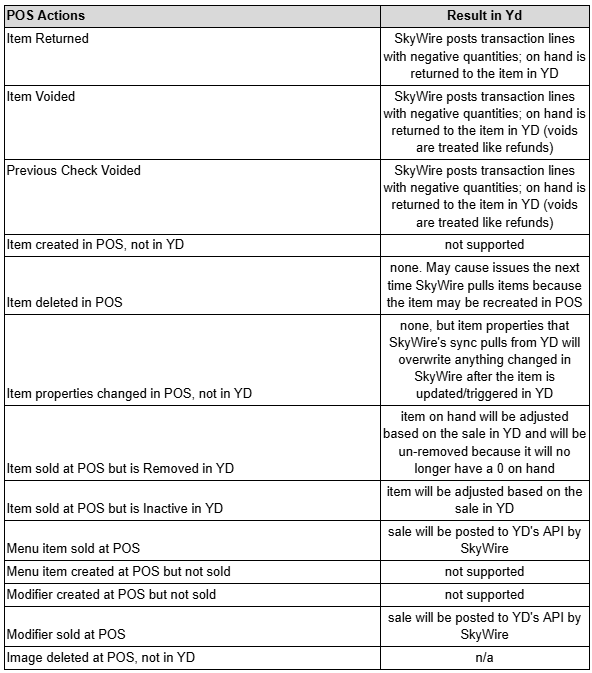
Workflows - Where Performed
Accounting Export :
Revenue only (Retail*Quantity-Discounts)
Limitations
Unsold items are not supported in this integration; F&B items from Skywire can only be mapped to recipes in Yellow Dog after they have been sold and Skywire has posted the sale(s) to Yellow Dog’s API.
Potential Rounding errors with discounts in sales